
You've Outgrown the WhatsApp Business App: The Three Ways Out (2026)
The free WhatsApp Business app has seven hard ceilings, and the one that costs you most money isn't a number in a settings screen. Here's every real limit in 2026, why your 256-contact broadcast reaches far fewer, and the three ways out — including the one that lets you keep the app.
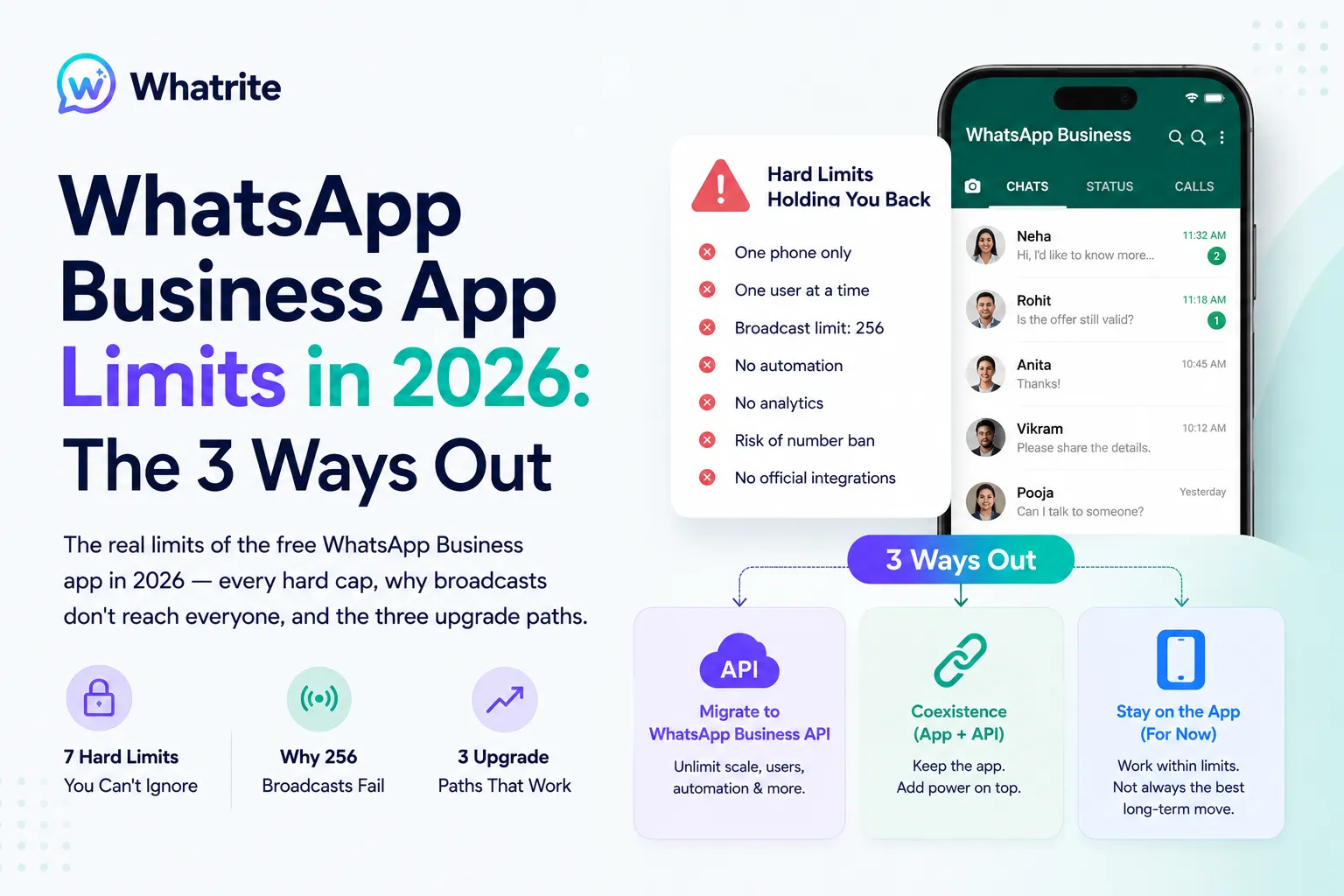
Most businesses don't leave the free WhatsApp Business app because they read a comparison table. They leave because of a specific Tuesday afternoon.
A second staff member needs to reply and there's only one phone. A festival offer goes out to 256 contacts and forty people see it. Someone's number gets banned mid-campaign with no warning and no explanation. The app didn't gradually become inadequate - it hit a wall that was always there, printed nowhere.
This is the honest version of where those walls sit in 2026, which ones actually matter, and the three ways past them. One of those three didn't exist a couple of years ago, and it changes the maths for a lot of businesses.
First: which WhatsApp are you actually on?
Three different products share one brand, and most confusion in this topic comes from mixing them up.
- WhatsApp Messenger - the consumer app. Green tick nowhere, no business tools. If you're running a business on this, the limits below aren't your problem yet; start here instead.
- WhatsApp Business app - the free app with a separate download, catalogue, labels, greeting messages, broadcast lists. Runs on a phone. This is what this article is about.
- WhatsApp Business Platform (Cloud API) - no app at all. A connection Meta provides that software talks to. This is what platforms like whatrite are built on.
The quickest test: if there's a phone in the room that must stay charged and connected for your business messaging to work, you're on the Business app.
The hard caps, in one table
These are the fixed numbers in the free app as of 2026.
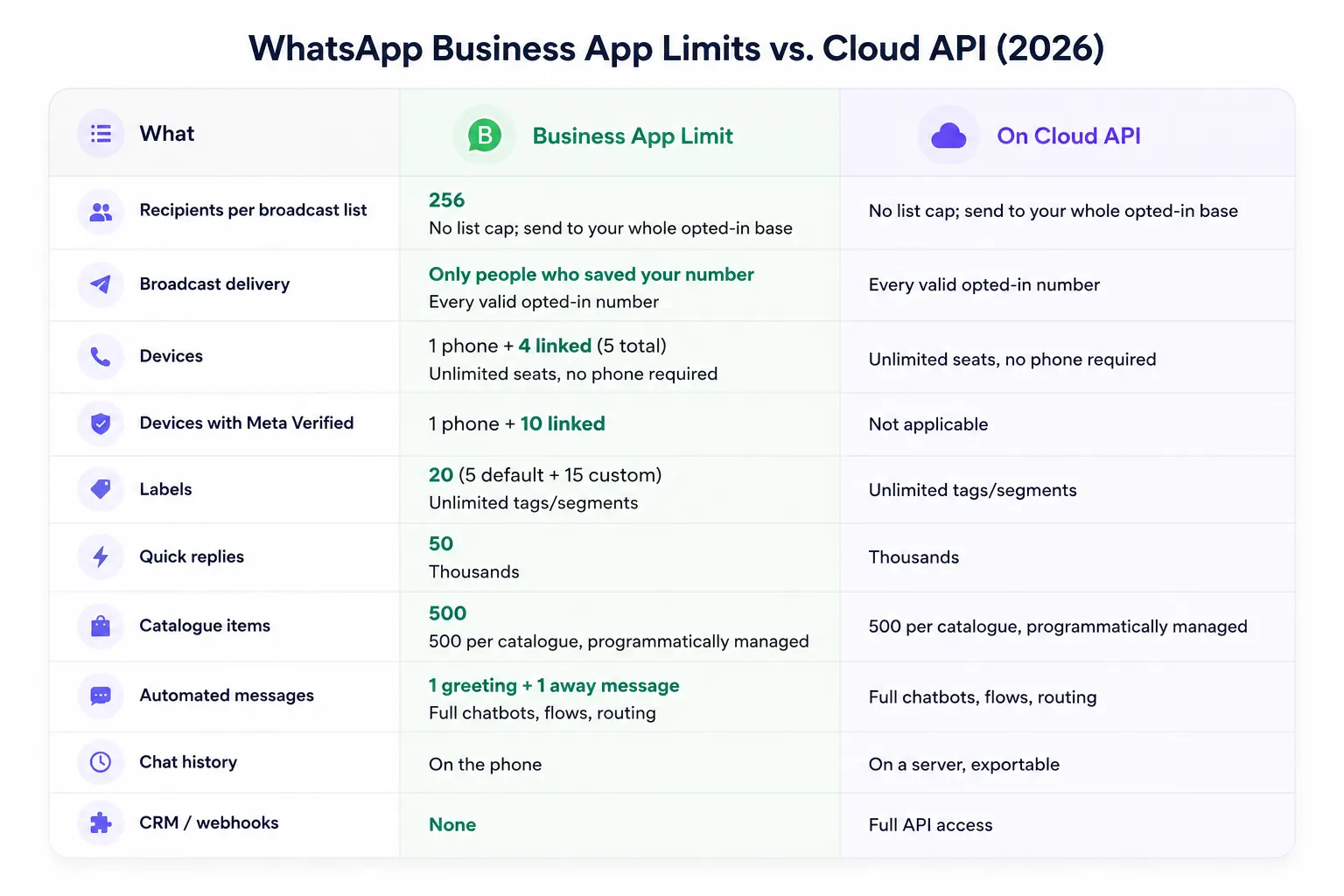
Two of those rows do more damage than the rest combined. Take them in order.
The broadcast lie: why 256 isn't 256
Everyone quotes the 256-recipient cap. Almost nobody explains the rule underneath it, which is the one that actually costs you money:
A WhatsApp broadcast only reaches recipients who have saved your number in their contacts.
Not "is more likely to reach." Does not reach. If a customer messaged you last week but never tapped Add to contacts, your broadcast does not arrive for them. There is no setting to change this and no way around it.
So the real reach of a "256-person broadcast" is 256 minus everyone who never saved you - which, for any business whose customers found them through an ad, a website, a marketplace or a walk-in, is most of the list. A shop that broadcasts a Diwali offer to four full lists thinks it reached 1,024 people. It may have reached a few hundred.
The damage isn't the low number. It's the wrong conclusion. Businesses run this twice, see almost no response, and decide "WhatsApp broadcasts don't work for us" - when what actually happened is that a delivery rule they were never told about silently filtered most of their audience. They then stop using the one channel their customers actually read.
On Cloud API this rule doesn't exist. Business-initiated messages go to any number that has opted in, saved or not, using approved templates. That single difference is why most businesses move.
The five structural walls
The caps are annoying. These are the ones that stop a business growing.
1. One identity, no team. Linked devices don't create users - they mirror the same account. Everybody is "the business." There's no assignment, no way to see who is handling a conversation, no private internal notes, no @mentions, no audit trail. Two staff open the same chat and reply over each other. The app was designed for one owner with one phone, and no number of linked devices changes that. If you need more than one number or more than one team, the model simply doesn't stretch.
2. No API, so nothing connects. No webhooks, no integrations, no automation triggers. Your leads live in WhatsApp and your records live somewhere else, and the bridge between them is a human retyping things. Every lead-source report becomes a guess, and responding in under a minute stops being possible once volume rises.
3. Your data lives on someone's phone. Chat history is on the device. The phone breaks, gets lost, or leaves with a departing employee - and the conversation history for those customers leaves with it. There's no server-side export, no central archive, no way to hand a customer's full history to whoever takes over the account.
4. Ban risk with no dashboard. The Business app is the single most common way Indian businesses get a number banned, because it looks like it supports bulk messaging and doesn't. Recipients who never saved you can't receive your broadcast, but they can report you when you find another way to reach them. On the API you can at least see a quality rating and a messaging tier, and manage them. On the app you get no rating, no tier visibility, and no warning - the number just stops working. And the number that stops working is the one printed on your signage.
5. No attribution. You can run Click-to-WhatsApp ads pointing at a Business app number, and conversations will arrive. What you can't do is capture which ad produced which conversation in any system you own. The referral data exists in the message payload, and only API access lets you read it — so ad spend stays unattributable.
When you should just stay on the app
Most articles on this topic never reach this section. It matters, because upgrading when you don't need to costs money and adds work.
Stay on the free Business app if all of these are true:
- One person, or one shared phone, handles every conversation
- You're answering customers, not initiating campaigns to cold lists
- Under roughly 50–100 conversations a day
- Your customers mostly have your number saved already - repeat local trade, referrals, existing patients or students
- You have no software you need WhatsApp to talk to
That's a genuinely large number of businesses, and for them the app is the correct tool. It's free, it works, and the API would add cost and setup for benefits they wouldn't use.
The trigger to move isn't size. It's the appearance of a second person or a first campaign. Either one breaks the app's core assumption, and no configuration fixes it.
Path A: Coexistence — keep the app, add the API
This is the option most comparison articles are still missing, and it's the biggest change to this topic in years.
Meta now supports running the Business app and Cloud API on the same number at the same time. Your staff keep replying from the phone; software gets API access to the same number in parallel. You no longer have to choose.
What comes across when you switch it on:
- All your WhatsApp contacts
- Up to 180 days of one-to-one chat history, synced in phases (first the last day, then up to 90 days, then up to 180)
- Media only syncs if it was sent within 14 days of onboarding - older photos and PDFs don't come
- After that, messages mirror both ways in real time: a reply typed on the phone appears in the software, and vice versa
What you give up — and this part is rarely written down:
- Broadcast lists are disabled. Entirely. You do your outbound through the API with templates instead.
- Throughput is capped at 20 messages per second while a number runs in both places. Fine for conversations; a real ceiling for large campaigns.
- Disappearing messages, view-once messages and live location are switched off in one-to-one chats.
- Catalogues, orders, away messages and quick replies stay app-only - they don't work through the API side.
- Your app needs to be on version 2.24.17 or newer, and your provider has to support Coexistence — not all do.
Coexistence suits you if the phone workflow is genuinely working and your problem is the missing half - automation, records, integrations, reporting - rather than the app itself. You keep muscle memory and history, and add capability alongside it.
Path B: Full migration — a clean API number
The traditional route: take the number onto Cloud API properly, and stop using the Business app for it.
What it costs you:
- Chat history does not transfer. The conversations on that phone stay on that phone. Export what you need before you start, because you can't pull it afterwards.
- The Business app stops working for that number. Staff who lived in the app move into a shared inbox.
- Media and older attachments don't come across.
What you get: everything the app structurally can't do. Real users with real roles and an audit trail. Unlimited seats without a phone in the loop. Templates that reach opted-in contacts whether or not they saved you. Chatbots and flows instead of one away message. Drip sequences that follow up when humans forget. Full throughput for campaigns. Data on a server you can export.
One detail worth knowing before you commit: the move isn't instantly irreversible. There's roughly a 30-day window in which you can revert the number from Meta Business Suite. After that it's permanent. Treat that month as your real evaluation period - put actual traffic through it rather than testing with two colleagues.
Before you go, read the 24-hour window and what API messaging actually costs in India. Business-initiated messages are priced per message on the API and free on the app, and that's the one line item that genuinely gets more expensive when you move.
The compliance gap nobody mentions
India's Digital Personal Data Protection framework asks businesses to do things the Business app gives you no mechanism for. This isn't about penalties — it's about what you can produce when someone asks.
- Consent records. You're expected to show that a contact agreed to be messaged, and for what. The app has no consent field and no log. Your evidence is a screenshot, if that.
- Erasure requests. When a customer asks you to delete their data, you must be able to. On the app their history sits in one thread on one phone, and possibly in a device backup you don't control.
- Access requests. Producing everything you hold about one person means scrolling a chat by hand.
- Who saw what. No roles, no permissions, no audit log. Anyone holding the phone can read every customer conversation, and nothing records that they did.
For anyone handling minors' data - coaching institutes, schools, paediatric clinics - this gets sharper, because consent has to come from a parent and you have to be able to evidence that it did. A shared phone with 20 labels is not a system that can answer these questions.
An API-based platform doesn't make you compliant on its own. It does give you the places to put consent, roles, exports and audit trails - places that simply don't exist in the app.
How to decide, in one pass
Work down this list and stop at your first yes.
1. Is more than one person replying, or about to be? → the app can't do this. Path A or B.
2. Do you need to message people who haven't messaged you first? → the app can't reliably do this. Path A or B.
3. Does WhatsApp need to talk to other software? → API required. Path A or B.
4. Is the phone workflow working, and history worth keeping? → Path A (Coexistence).
5. Do you want one clean system and can accept losing history? → Path B (full migration).
6. None of the above? → Stay on the app. You'll know when this changes.
The mistake isn't picking the wrong path. It's staying on the app for another year after question 1 turned into a yes, losing leads to a delivery rule nobody explained, and concluding that WhatsApp doesn't work for your business.
FAQ
What is the WhatsApp Business app's biggest limitation?
Not a number — it's that the app assumes one person on one phone. Everything else, from the 256-recipient broadcast cap to the missing audit trail, follows from that. The most expensive practical limit is that broadcasts only reach people who saved your number.
How many people can use the WhatsApp Business app at once?
One primary phone plus four linked devices, so five. Meta Verified raises that to ten linked devices. But these mirror one shared identity - there are no separate users, no assignment and no permissions, however many devices you link.
Why is my WhatsApp Business broadcast not reaching everyone?
Because recipients must have your number saved in their contacts to receive a broadcast. Anyone who hasn't saved you gets nothing, and you're not told. This is the most common reason a broadcast appears to fail.
Can I use the WhatsApp Business app and the API on the same number?
Yes - Meta's Coexistence support allows both on one number simultaneously, syncing your contacts and up to 180 days of chat history, then mirroring new messages both ways. Broadcast lists are disabled and throughput is capped at 20 messages per second while both are active. Your provider has to support it.
Do I lose my chat history if I move to the WhatsApp Business API?
On a full migration, yes - history stays on the phone and can't be imported, so export anything you need first. Via Coexistence you keep contacts and up to 180 days of one-to-one history, though media only syncs if sent within 14 days of onboarding.
Can I undo a migration to the API?
There's roughly a 30-day window to revert the number from Meta Business Suite. After that the move is permanent, so use that month for real testing.
Does Meta Verified remove the app's limits?
No. It adds a verified badge, impersonation protection and ten linked devices instead of four, for a monthly subscription (from around ₹639/month in India). It does not add users, API access, an audit trail, or change how broadcasts are delivered.
Is the free WhatsApp Business app enough for a small business?
Often yes. One person answering incoming messages, under about 50–100 conversations a day, customers who already have your number saved, no software to integrate - the app is the right tool and upgrading would add cost without benefit. The moment a second person starts replying, or you need to run a campaign, it stops being enough.