Click-to-WhatsApp Ads
Leads click, then vanish. Click-to-WhatsApp fixes that broken handoff — and Whatrite keeps every conversation in one dashboard.
If you are running Meta ads and watching your cost per lead climb every quarter, you are not alone. The average real estate lead costs three to five times more on a web form than it did two years ago, and coaching businesses are reporting that gated landing pages are converting at half the rate they saw in 2022. Click-to-WhatsApp ads cut that cost significantly for one reason: they move the conversation to a channel where your team can respond in seconds, not hours. This is not a new idea, but the infrastructure to act on those clicks automatically has only recently become accessible to teams that are not running enterprise Meta BSP accounts.
What Click-to-WhatsApp Ads Actually Do
Click-to-WhatsApp ads, commonly referred to as CTWA, are a Meta ad format that places a direct entry point to a WhatsApp Business account inside a standard Feed ad, Story, or carousel. When a person taps the button, their WhatsApp app opens with a pre-filled message ready to send. The lead has taken one action, and your team now has an open conversation thread on a channel with 98 percent open rates.
For lead generation agencies, this changes the math in two ways. First, the friction to initiate contact drops to a single tap on a screen they already have open. Second, WhatsApp carries intent in a way that a form submission does not. When someone types a message, you can extract budget, timeline, and location from the first response. That context arrives with the lead instead of requiring a follow-up email sequence that loses half the prospects before they answer the first question.
Why This Fits Real Estate and Coaching Businesses Particularly Well
Property consultants working with portal leads from 99acres, MagicBricks, or Housing.com are already familiar with WhatsApp as a primary communication channel. Buyers expect to continue conversations there. CTWA bridges the gap between an ad that generates awareness and a conversation that generates a site visit or a call.
Coaching businesses and D2C brands face a different version of the same problem. Their leads have a specific question or a stated goal. A web form captures that intent as a data point; a WhatsApp conversation captures it as the start of a relationship. The difference shows in follow-up conversion rates.
The Workflow Most Teams Skip
Most teams set up CTWA, watch the leads arrive, and then assign them manually. That is where the speed advantage dies. If a lead arrives at 9 PM and your team sees it at 9 AM, you have just handed your competitor an eleven-hour head start. The workflow that makes CTWA worth running is the one that starts acting on the lead the moment the click happens.
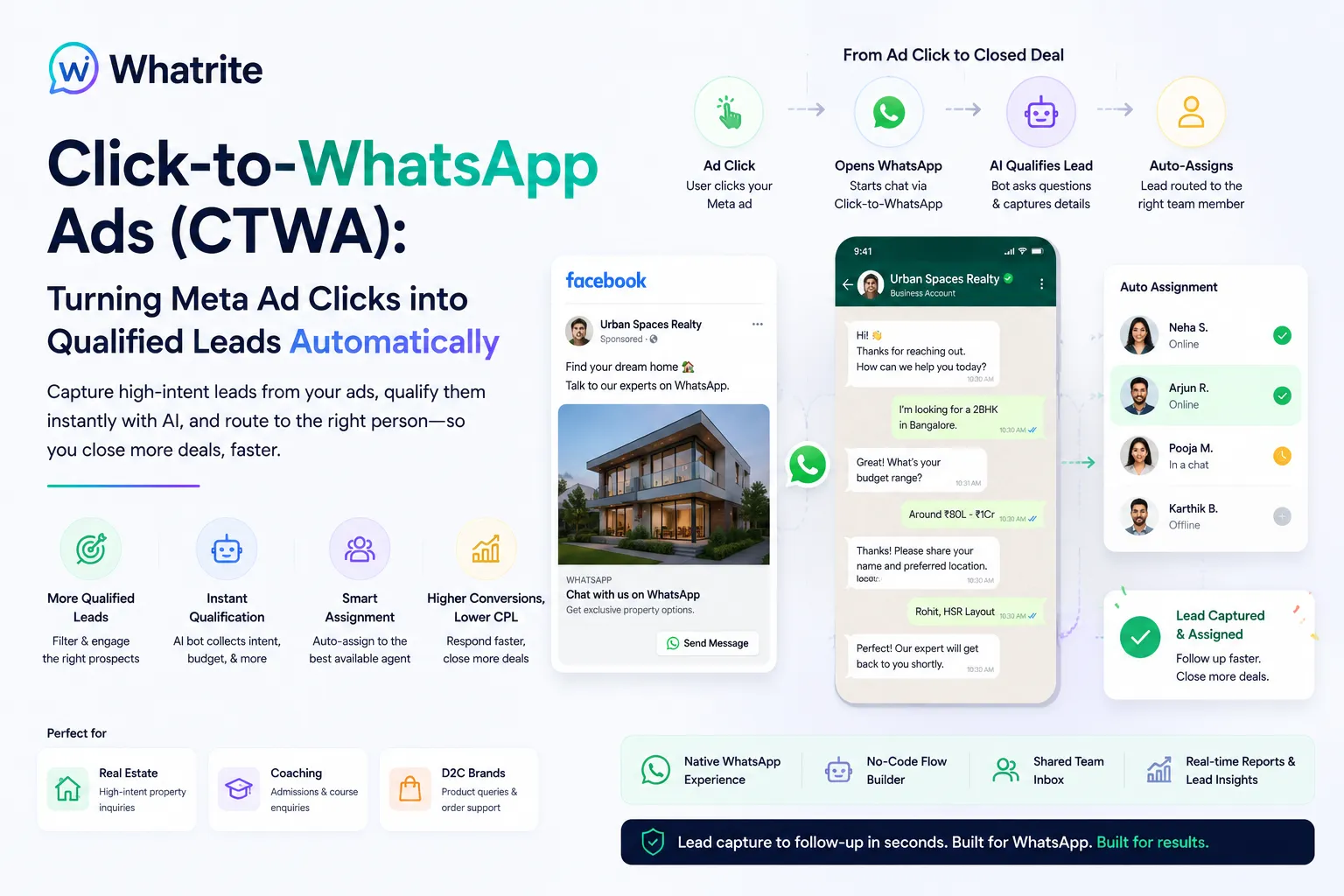
Whatrite builds this flow into its platform. When a prospect taps a Click-to-WhatsApp ad, the message routes to a qualification bot before anyone on your team reads it. The bot asks two or three qualifying questions: budget range, location preference, timeline. The prospect answers in the same chat thread. Within seconds, the lead is scored, qualified, and assigned to the next available agent using round-robin logic.
The Three-Step Flow
- CTWA trigger: The Meta ad click opens a WhatsApp chat with your business number. A webhook fires in the background and routes the message to Whatrite's automation layer.
- Qualification bot: A configurable chatbot template greets the lead and collects key data points. This runs on AI-powered reply automation that can handle common objections, re-engage cold leads, and hand off to a human when the conversation stalls.
- Round-robin assignment: The qualified lead is assigned to the next agent in your configured list. The assignment happens in seconds, and your agent sees the full conversation history and qualification data before they type a single word.
This is the sequence that separates teams using CTWA as a marginally better contact form from teams that treat it as a 24-hour sales machine. The qualification bot runs outside business hours, which matters in India where portal traffic peaks between 8 PM and 11 PM but your sales team is not online.
Setting Up CTWA in Meta Ads Manager
The configuration lives inside your Meta Business Manager and is straightforward for anyone who has run Lead Ads before. You choose the Click to WhatsApp objective when creating the campaign, select the WhatsApp Business account connected to your phone number or BSP setup, and write the greeting message that appears when the chat opens. That greeting is your first qualification opportunity.
A greeting that reads "Hi! We help you find 2 and 3 BHK apartments in Pune. What's your budget?" will attract leads further along in their decision cycle than one that says "Hi, thanks for reaching out." specificity is the difference between a qualification bot that asks two follow-up questions and one that asks six.
You will also want to configure your business hours correctly in your WhatsApp Business account. Outside those hours, your qualification bot should still be active. Whatrite's automation layer lets you set different responses for business hours and after-hours, so no lead ever hits a dead end regardless of when they click.
One Account or Multiple: The Multi-WABA Consideration
If you manage WhatsApp Business accounts across multiple brands or locations, each WABA functions as its own sending identity. A click on an ad for your Pune project routes to a different WABA than a click on an ad for your Bangalore project. Whatrite's multi-tenant dashboard lets you manage all of those WABAs from one login, which matters for franchises and agencies running concurrent campaigns across regions.
Avoiding the Meta Compliance Pitfalls
WhatsApp's 24-hour messaging window is the constraint that most CTWA guides omit. Once a lead sends an opening message, you have 24 hours to send follow-up messages before you need a template approval from Meta. Teams that treat WhatsApp as an open-ended email channel hit a wall when Meta starts restricting their sending permissions.
Whatrite surfaces these windows in your lead dashboard so your team knows when a conversation is approaching the 24-hour mark. For drip sequences that run beyond 24 hours, the platform supports approved template messages that restart the window cleanly. You should plan your nurture sequence before you launch the ad, not after you start getting responses.
Rate limits are the other constraint. A single WABA can send a limited number of messages per minute and per day. Teams running high-volume campaigns need to distribute sends across multiple phone numbers or work with a BSP partner that has provisioned additional capacity. Whatrite handles this architecture for you, but you should understand that volume has a ceiling that is set by Meta, not by your platform.
Measuring What Matters
Standard Meta campaign metrics tell you impressions, clicks, and cost per click. What CTWA actually needs to prove its value is a downstream view: how many WhatsApp conversations became qualified leads, how many qualified leads were assigned to an agent within your target response time, and how many of those assignments converted to a booked call or site visit. That data lives in your CRM if you are logging it, but it should also be visible in your messaging platform's dashboard.
Whatrite tracks time-to-first-response at the agent level, which is the metric most predictive of conversion in WhatsApp-based lead flows. A lead assigned within 60 seconds of qualification converts at significantly higher rates than one that waits 20 minutes. If your round-robin assignment is working correctly, your response time distribution should be roughly equal across agents over a two-week period.
For performance marketers reporting to clients, this data makes CTWA auditable in a way that a website contact form never was. You can show conversation transcripts, qualification data, and agent response times alongside the standard Meta numbers.
The Bottom Line
Click-to-WhatsApp ads are not a replacement for your website funnel. They are a parallel entry point that is faster to convert and richer in data. The teams that extract the most value from them are the ones that treat the WhatsApp chat as the beginning of a sales process, not the end of an ad click.
Whatrite's platform is designed for exactly that workflow: from the CTWA trigger through qualification automation to round-robin assignment and beyond. If you are running Meta ads for real estate, coaching, or any D2C funnel and you are not routing those clicks through an automated qualification flow, you are leaving response speed on the table. Speed closes deals.
If you want to see how the platform handles multi-WABA management and automated qualification, you can explore Whatrite's product overview or check the pricing page to understand what a setup for your volume looks like.