The WhatsApp 24-Hour Window Explained: Service Messages, Templates, and How to Cut Costs
The 24-hour window is your free messaging window on WhatsApp. Miss it, and every reply costs you a template fee. Here's the breakdown.
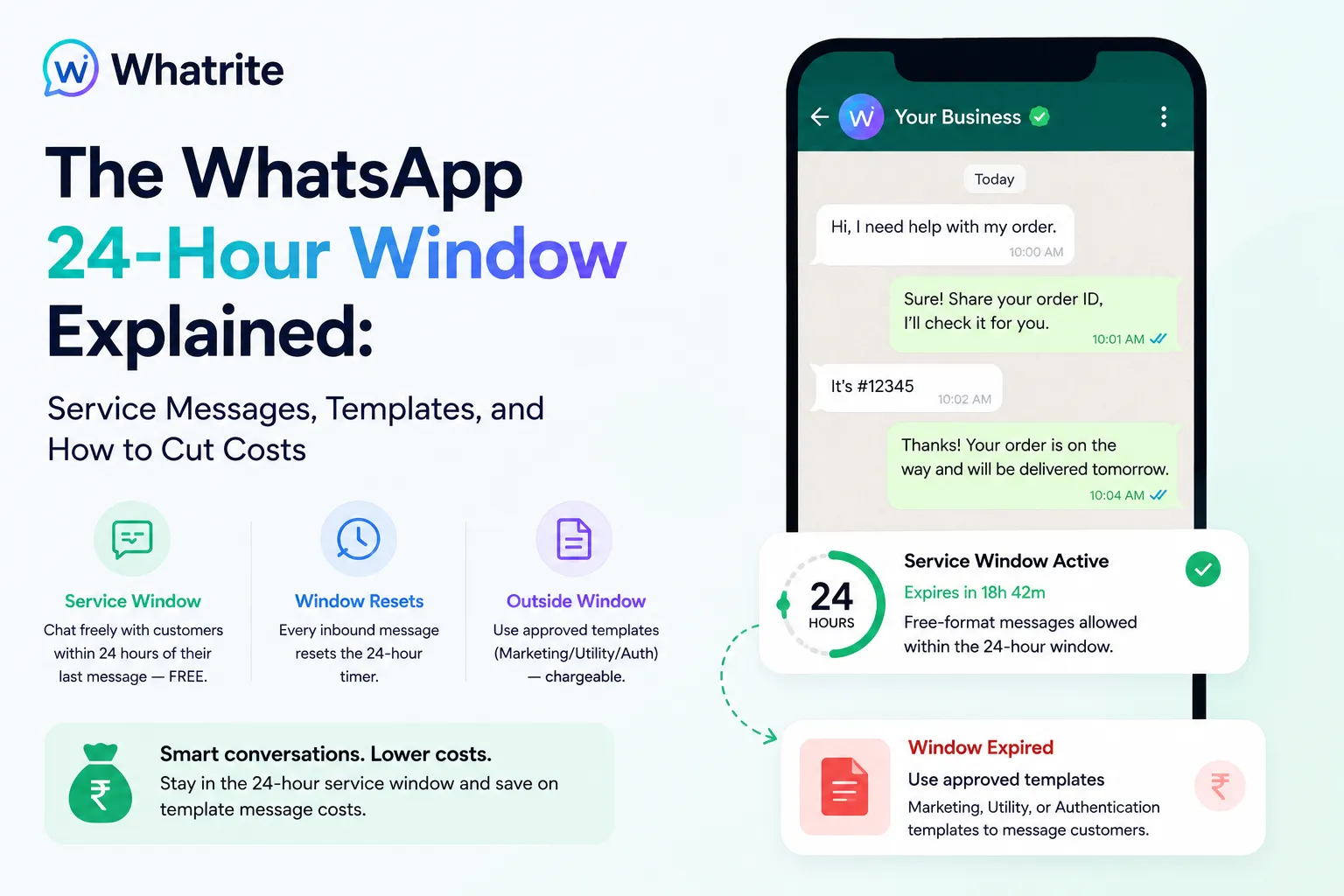
The WhatsApp 24-hour window is one of the most misunderstood concepts in business messaging, and it costs more than it should for teams that get it wrong. This timer determines whether you can reply using free standard conversation rates or pay for pre-approved templates. Getting this right is the difference between a WhatsApp strategy that scales and one that eats into your budget on messages you could have sent at no charge.
What the WhatsApp 24-hour window actually is
The 24-hour window, sometimes called the WhatsApp service window or customer service window, is a conversation timer that starts when a customer sends you a message. During this window, your business can reply with standard messages at no extra cost per message. You can also send proactive service notifications like appointment confirmations or delivery updates without triggering template charges.
Once the 24 hours expire, the conversation session closes. To reach that customer again, you must use a pre-approved template message and pay the associated business-initiated rates. This distinction between WhatsApp session messages and template messages is the foundation of how Meta prices the API.
Why the pricing structure matters
Meta classifies every message as either customer-initiated or business-initiated. Customer-initiated messages (anything sent while the service window is active) are billed at lower conversation rates. Business-initiated messages sent outside the window using templates cost more per message. If your team relies on templates to follow up with leads when the window has closed, you are paying premium rates for conversations that could have continued at standard pricing.
How the timer resets (and why this matters for your costs)
Every inbound message from the customer resets the 24-hour timer. This is the part many teams overlook, and it changes how you should think about lead nurture and support flows. When a lead responds to your outreach, their reply triggers a fresh 24-hour window, giving you another full day to continue the conversation at standard rates before a template becomes necessary.
This means you can extend conversations naturally by responding to inbound activity instead of paying for proactive messages every time. A lead who asks a follow-up question at hour 22 gives you 24 more hours to work with. Building your automation and team workflows around this reset behavior is one of the simplest ways to reduce your monthly WhatsApp bill.
Using automation to work within the window
Whatrite lets you build AI-powered reply flows that engage customers within the service window, keeping your costs low while maintaining response times. When the window is active, your bot can answer common queries, qualify leads, and route complex issues to human agents without triggering template message charges. This approach reduces manual follow-ups and lets your team focus on conversations that require human judgment.
For teams handling portal leads from platforms like 99acres or MagicBricks, this matters. A property enquiry that arrives at 10 PM IST can be acknowledged automatically, answered by the bot overnight, and escalated to your agent only if the prospect asks about site visits or pricing. Your team starts the next morning with a warm lead that already answered most of their own questions.
When you need to use paid templates instead
Two scenarios require templates. First, proactive outreach sent when the customer has not messaged you recently. Marketing offers, reminder notifications, and re-engagement campaigns fall into this category and must use templates to be delivered outside the service window. Second, messages with structured content like order confirmations, shipping updates, or appointment reminders that need specific formatting.
Template messages cost more per message than session replies, but they serve a different purpose. They are the right tool when you need to reach out without an inbound trigger. The mistake is using templates to follow up on conversations that could have continued for free if your team had stayed within the window.
The India context: timing your campaigns
For teams operating in India, the 24-hour window has a practical impact on campaign timing. Consider a customer who messages at 9 PM IST. Your team responds at 9:15 AM the next morning, still well within the window, and the conversation continues at standard rates. But if you need to send a reminder at 8 AM to a customer who has not messaged you in 26 hours, that requires a template and incurs business-initiated rates.
Designing your flows around this timing, rather than fighting against it, keeps costs predictable. Schedule your outbound campaigns when your audience is most likely to engage and trigger a fresh window. Use templates only when the service window has genuinely closed and your message is genuinely proactive.
Cutting costs with the WhatsApp 24-hour window
The most direct way to reduce your WhatsApp spend is to maximize what you do inside each service window before paying for a template. This means prioritizing urgent customer queries, automating responses to frequently asked questions, and ensuring your team resolves open issues before the timer expires.
Whatrite's dashboard surfaces active conversation timers so your agents know exactly how much time remains before a window closes. When a conversation is approaching expiration with an unresolved issue, your team can either speed up the response or send a template-based follow-up while the context is still fresh. This turns the 24-hour window from a constraint into a planning tool for managing both customer experience and message costs.
You can see this in action on the Whatrite pricing page, where the cost difference between session and template messages is broken down by conversation type. Understanding these rates upfront helps you build flows that use each message type strategically rather than defaulting to templates for every follow-up.
Best practices for support and ops teams
For teams new to the WhatsApp API, the 24-hour window can feel like a constant deadline. With the right setup, it becomes a natural rhythm instead of a ticking clock. Here are the habits that make the difference.
- Prioritize urgent queries inside the window. Customers with blocked payments, appointment changes, or time-sensitive questions should get a human response immediately. Automate the rest.
- Set internal alerts for conversations approaching expiration. When a window is about to close with an open ticket, your team needs to know before it closes, not after.
- Approve your templates in advance. Meta's template review process can take a few business days. Building a library of common templates before you need them means you are never scrambling for a message format when a window is about to expire.
- Use inbound triggers to extend conversations. If a customer replies to a campaign email with a WhatsApp message, that reply resets the window. Design your multi-channel flows to take advantage of this.
The goal is not to race against the clock. It is to build a workflow where your team works within the window efficiently, automates what it can, and uses templates only when the service window has genuinely closed. That balance is what makes WhatsApp a scalable customer communication channel rather than an expensive one.